This week I still have some new things to explain about PlanEat.
Bad News - Android sucks
So, I guess it’ll probably be the end of PlanEat. And probably a time to try other OSes again on my phone. (I have a PinePhone for a few years, but there is a lot to explore). Google is trying to kill Android once again. So, I encourage you to read https://keepandroidopen.org/ For me, I still don’t know what I’ll do with PlanEat. Probably kill it. That was fun, but I have other ideas. Anyway, this week I wanted to share about how I classify recipes in PlanEat. Here is a screenshot of the app:
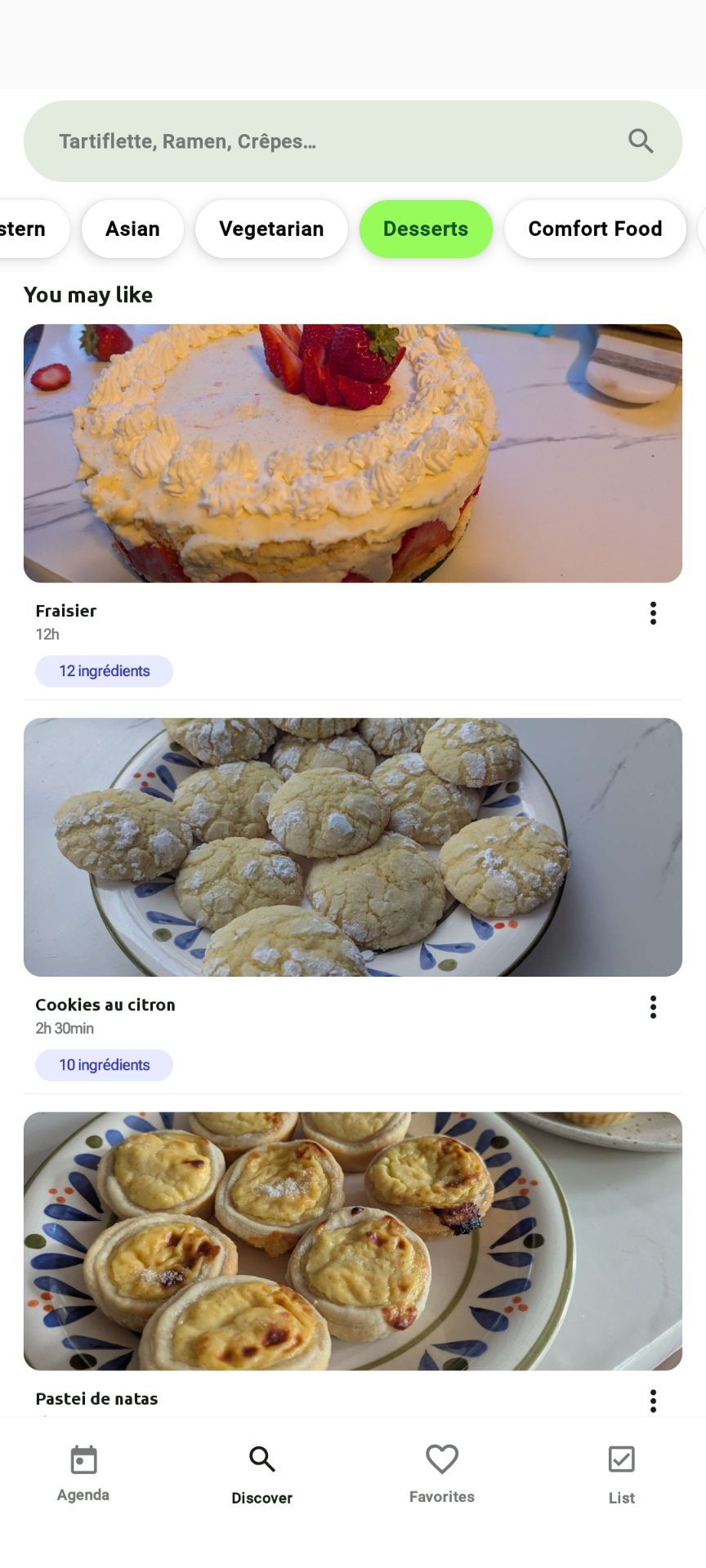
Where, on the top, I can filter recipes by type: All, Easy, Medium, Hard, Appetizer, Healthy, Middle Eastern, Asian, …
For All, it’s easy (I show all the recipes). Easy/Medium/Hard is based on the time you need to cook. But the rest is not so trivial.
How to classify recipes
Create a plan of attack
AI is generally a classic solution for classification problems on non-trivial data. There is pleeeeeenty of classifier available in the wild. I’m not an expert in this field and I definitely have a lot to learn. But I basically know the process.
First, there is good documentation if you want to start to play with models. I’d recommend to check:
- TensorFlow
- SciKit
- PyTorch
They got a lot of resources and tutorials explaining different use-case. The thing is, I’m developing for an Android App. So, to my knowledge, the best solution is to choose TensorFlow Lite (now LiteRT). So, I know I need to create a .tflite file for my app.
But it’s basically possible to convert models generated by some library to tflite pretty easily, so it’s not really a limitation.
When you try to solve a classification problem with AI, I guess the two big steps are:
- Choose which model(s) you will need to train
- How to create a dataset that will be good enough to get the results you need
Note, for 1, nowadays there is plenty of already pre-trained models for everything you need available on https://huggingface.co/ But I think my problem is simple enough to do my own model (and I want to learn things about this).
In my case, I basically seek something like (Model(Recipe)->List<Labels>) where I already know my output labels. So I want to do something called Multi Label Classification.
Let’s now create the model.
Create the dataset
This part only may need several articles. Seems trivial (just get enough data to train your model), but in reality, you need to get the good amount of data to train your model correctly. If you want to know more about this, I can recommend to start to search “overfitting and underfitting” in your favorite search engine.
But for Multi Label Classification, you will need:
- Labels (in my case, “Appetizer”, “Healthy”, “Middle Eastern”, “Asian”, …)
- Two datasets. In my case a .csv of two columns (value/result or “a simplified Recipe”/“a list of tags”):
- One for training your model. It’s about 9 times larger than the second dataset
- One to evaluate the pertinence of your trained model.
To get a lot of data, there is no magic. You will need to scrape pages and construct structured data. Note, you have to respect some rules if you scrape data and you need to follow website rules too. So, now let’s say you have thousands of lines like the following:
{"title":"Chips de patates douces","tags":["amuse-gueule","chips de patates douces","chips","patate douce","sel","facile","bon marché","chips"],"ingredients":["800 g de patate douce","sel"]}@Vegetarian,Comfort Food
You will need 3 scripts:
- The one splitting your big dataset in two:
import pandas as pd
from sklearn.model_selection import train_test_split

# Load the data with "@" as the separator
df = pd.read_csv('input.csv', sep='@')

# Split the data into train and test sets
train_df, test_df = train_test_split(df, test_size=0.1, random_state=42)

# Save the train and test sets to CSV files with "@" as the separator
train_df.to_csv('train.csv', index=False)
test_df.to_csv('test.csv', index=False)

print(f"Train and test data have been split. Train data: {len(train_df)} rows, Test data: {len(test_df)} rows.")
- A script to train your model. In this script, you will need to clean a bit your data. Because to train the model, it will tokenize your text and you want to avoid to get two tokens for “épices”/“epices” for example. Or weird characters. Then, for multilabel classification, you need to transform your output in vectors. Because the model will only predict 1 output, if you want multiple result (such as “Vegetarian,Asian”), you basically transform the output to be a vector like [0100100000] where 1s are the active labels, 0s are the absent ones.
import pandas as pd
import tensorflow as tf
from sklearn.preprocessing import MultiLabelBinarizer
from tensorflow.keras.preprocessing.text import Tokenizer
from tensorflow.keras.preprocessing.sequence import pad_sequences
from tensorflow.keras.models import Sequential
from tensorflow.keras.layers import Dense, Embedding, LSTM
import json
import re

# Load your CSV data
df_train = pd.read_csv('train.csv')
df_test = pd.read_csv('test.csv')

# Convert Tags column from string representation to lists
def convert_to_list(tag_str):
    return tag_str.split(',')

df_train['Tags'] = df_train['Tags'].apply(convert_to_list)
df_test['Tags'] = df_test['Tags'].apply(convert_to_list)

# Clean and preprocess the text data
def clean_text(text):
    text = re.sub(r"[^a-zA-Z\s]", "", text)  # Remove special characters, digits, etc.
    text = re.sub(r"\s+", " ", text).strip()  # Remove extra spaces
    return text.lower()

# Function to extract and concatenate relevant fields from Recipe JSON
def process_recipe(recipe_json):
    # Load the JSON from string, if necessary
    recipe = json.loads(recipe_json) if isinstance(recipe_json, str) else recipe_json
    title = recipe.get('title', '')
    ingredients = ' '.join(recipe.get('ingredients', []))
    tags = ' '.join(recipe.get('tags', []))

    # Concatenate title, ingredients, and tags into one string
    full_text = f"{title} {ingredients} {tags}"
    return clean_text(full_text)

# Apply the recipe processing function
df_train['Recipe'] = df_train['Recipe'].apply(process_recipe)
df_test['Recipe'] = df_test['Recipe'].apply(process_recipe)


# Prepare the data
tokenizer = Tokenizer(oov_token="<OOV>", num_words=100000)
tokenizer.fit_on_texts(df_train['Recipe'])
X_train = tokenizer.texts_to_sequences(df_train['Recipe'])
X_test = tokenizer.texts_to_sequences(df_test['Recipe'])

print(df_train['Recipe'])
# Check how many words the tokenizer captured
print(f"Number of unique tokens: {len(tokenizer.word_index)}")

max_length = max(max(len(seq) for seq in X_train), max(len(seq) for seq in X_test))
X_train = pad_sequences(X_train, maxlen=max_length)
X_test = pad_sequences(X_test, maxlen=max_length)

# Convert tags to binary format
mlb = MultiLabelBinarizer()
y_train = mlb.fit_transform(df_train['Tags'])
y_test = mlb.transform(df_test['Tags'])
Then I define my model to train:
# Define the model
model = Sequential([
    Embedding(input_dim=len(tokenizer.word_index) + 1, output_dim=128, input_length=max_length),
    LSTM(64, return_sequences=True),
    LSTM(32),
    Dense(len(mlb.classes_), activation='sigmoid')
])
model.compile(optimizer='adam', loss='binary_crossentropy', metrics=['accuracy'])

# Train the model
model.fit(X_train, y_train, epochs=50, batch_size=32, validation_split=0.1)

# Evaluate the model
loss, acc = model.evaluate(X_test, y_test)
print(f"Model evaluation results: Loss = {loss}, Accuracy = {acc}")
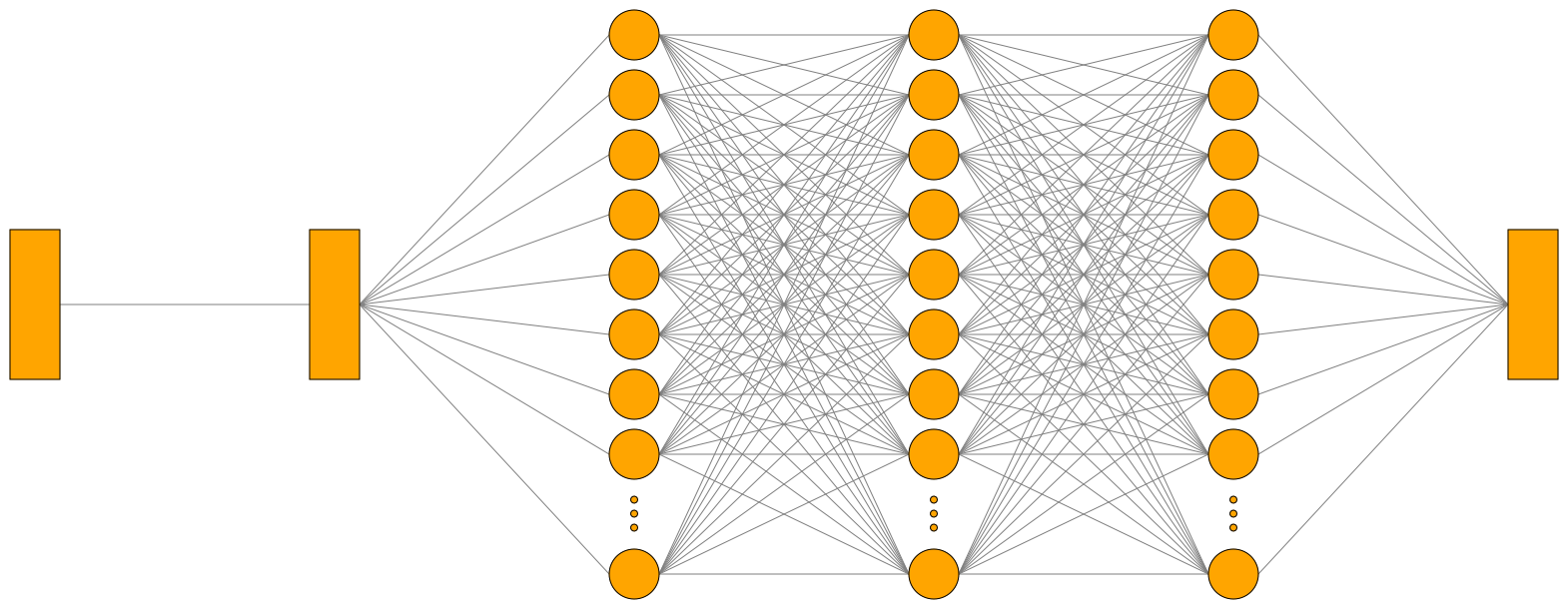
Here, I define a Neural Network than converts my input to a vector of 128 nodes followed by 2 LSTM models (this is used to discover dependencies in a text) and a Dense model that will give me the probability for each tags. And I train this model on 90% of the model, validate it against 10% of the data and print the precision.
Finally, I convert it to a tflite model with:
# Export the model to TensorFlow Lite format
converter = tf.lite.TFLiteConverter.from_keras_model(model)
converter.target_spec.supported_ops = [tf.lite.OpsSet.TFLITE_BUILTINS, tf.lite.OpsSet.SELECT_TF_OPS]
converter._experimental_lower_tensor_list_ops = False
tflite_model = converter.convert()

# Save the model
with open('model_multi_label.tflite', 'wb') as f:
    f.write(tflite_model)

print("Model exported to TensorFlow Lite format.")
And now I can use my model on Android. But I also can test it directly in Python with:
import numpy as np
import tensorflow as tf
import pandas as pd
from tensorflow.keras.preprocessing.text import Tokenizer
from tensorflow.keras.preprocessing.sequence import pad_sequences
from sklearn.preprocessing import MultiLabelBinarizer
import re
import json

# Example recipe data
recipes = [
    {"title": "pates au pesto", "tags": ["healthy", "pates"], "ingredients": ["pates", "pesto", "fromage"]},
    {"title": "dumplings au poireau", "tags": ["vegetarian", "dumplings"], "ingredients": ["poireau", "pate", "oignon"]},
    {"title": "muffins aux pepites de chocolat", "tags": ["dessert", "chocolat"], "ingredients": ["farine", "morceaux de chocolat", "sucre"]},
    {"title":"Chips de patates douces","tags":["amuse-gueule","chips de patates douces","chips","patate douce","sel","facile","bon marché","chips"],"ingredients":["800 g de patate douce","sel"]},
    {"title":"Pain aux 5 bananes et au son","tags":["dessert","banane","fruit","desserts","à congeler","santé","choix sain"],"ingredients":["375 ml  (1 1\/2 tasse) de farine tout usage non blanchie","180 ml  (3\/4 tasse) de farine d’avoine","30 ml  (2 c. à soupe) de son de blé","5 ml  (1 c. à thé) de poudre à pâte","5 ml  (1 c. à thé) de bicarbonate de soude","500 ml  (2 tasses) de bananes bien mûres écrasées à la fourchette (environ 5 bananes)","125 ml  (1\/2 tasse) de cassonade légèrement tassée","60 ml  (1\/4 tasse) de yogourt nature 0 %","45 ml  (3 c. à soupe) d’huile de canola","2   oeufs"]}
]


# Clean and preprocess the text data
def clean_text(text):
    text = re.sub(r"[^a-zA-Z\s]", "", text)  # Remove special characters, digits, etc.
    text = re.sub(r"\s+", " ", text).strip()  # Remove extra spaces
    return text.lower()

# Function to extract and concatenate relevant fields from Recipe JSON
def process_recipe(recipe_json):
    # Load the JSON from string, if necessary
    recipe = json.loads(recipe_json) if isinstance(recipe_json, str) else recipe_json
    title = recipe.get('title', '')
    ingredients = ' '.join(recipe.get('ingredients', []))
    tags = ' '.join(recipe.get('tags', []))

    # Concatenate title, ingredients, and tags into one string
    full_text = f"{title} {ingredients} {tags}"
    return clean_text(full_text)

# Load training data
df_train = pd.read_csv('train.csv')

# Initialize and fit the tokenizer
tokenizer = Tokenizer()
tokenizer.fit_on_texts(df_train['Recipe'])

max_length = 262  # Replace with the actual max length from training

# Fit MultiLabelBinarizer with training data
mlb = MultiLabelBinarizer()
mlb.fit(df_train['Tags'].apply(lambda x: x.split(',')))  # Fit with the same tags as during training

def preprocess_recipe(recipe, tokenizer, max_length):
    """Preprocess a single recipe and convert to padded sequence."""
    sequence = tokenizer.texts_to_sequences([recipe])
    print(sequence)
    padded_sequence = pad_sequences(sequence, maxlen=max_length)
    return padded_sequence.astype(np.float32)

def predict_tags(recipe, model, tokenizer, mlb, max_length):
    """Predict tags for a given recipe using the provided model."""
    padded_sequence = preprocess_recipe(recipe, tokenizer, max_length)

    # Load the TFLite model
    interpreter = tf.lite.Interpreter(model_path='model_multi_label.tflite')
    interpreter.allocate_tensors()

    # Set input tensor
    input_details = interpreter.get_input_details()
    output_details = interpreter.get_output_details()
    interpreter.set_tensor(input_details[0]['index'], padded_sequence)

    # Run inference
    interpreter.invoke()

    # Get and process the output
    output_data = interpreter.get_tensor(output_details[0]['index'])
    predictions = (output_data > 0.8).astype(int)

    # Convert predictions to tags
    predicted_tags = [tag for idx, tag in enumerate(mlb.classes_) if predictions[0][idx] == 1]
    return predicted_tags

# Predict tags for each recipe
for recipe in recipes:
    title = recipe['title']
    text = process_recipe(recipe)
    tags = predict_tags(text, None, tokenizer, mlb, max_length)
    print(f"Recipe: {title}\nPredicted Tags: {tags}\n")
Embed in the app
Finally, to embed my classifier in my app, I just need to place the model in the assets of the app and do:
dependencies {
    // Classify recipes
    implementation(libs.litert)
    implementation(libs.tensorflow.lite.select.tf.ops)
    implementation(libs.litert.metadata)
    implementation(libs.litert.support.api)
}
class TagClassifier(val context: Context) {
    private val interpreter: Interpreter
    private val tokenizer: Map<String, Int>
    private val labels: List<String>
    private val maxLength = 262 // Replace with the actual max length from training
    init {
        // Load the TFLite model for assets
        interpreter = Interpreter(loadModelFile("model_multi_label.tflite"))


        // Load the tokenizer
        tokenizer = loadTokenizer(context.assets.open("tokenizer.json"))

        // Load labels
        labels = loadLabels(context.assets.open("labels.txt"))
    }

    private fun loadModelFile(fileName: String): ByteBuffer {
        context.assets.openFd(fileName).use { fileDescriptor ->
            FileInputStream(fileDescriptor.fileDescriptor).channel.use { fileChannel ->
                val startOffset = fileDescriptor.startOffset
                val declaredLength = fileDescriptor.declaredLength
                return fileChannel.map(FileChannel.MapMode.READ_ONLY, startOffset, declaredLength)
            }
        }
    }

    fun classify(recipe: String): List<String> {
        val input = preprocessRecipe(recipe)
        val output = Array(1) { FloatArray(labels.size) }
        interpreter.run(input, output)
        // Choose tags with more than 80% of probability
        val predictions = mutableListOf<String>()
        for (i in output[0].indices) {
            if (output[0][i] > 0.8f) {
                predictions.add(labels[i])
            }
        }
        return predictions
    }

    private fun loadTokenizer(inputStream: InputStream): Map<String, Int> {
        val tokenizerJson = inputStream.bufferedReader().use(BufferedReader::readText)
        val jsonObject = JSONObject(tokenizerJson)
        val tokenizerMap = mutableMapOf<String, Int>()

        jsonObject.keys().forEach { key ->
            val value = jsonObject.getInt(key)
            tokenizerMap[key] = value
        }
        return tokenizerMap
    }


    private fun loadLabels(inputStream: InputStream): List<String> {
        return inputStream.bufferedReader(Charset.forName("UTF-8")).useLines { lines ->
            lines.toList()
        }
    }

    private fun preprocessRecipe(recipe: String): ByteBuffer {
        // Convert the ingredient to a sequence of indices
        val sequence = tokenizer.entries.mapNotNull { (word, index) ->
            if (recipe.contains(word.lowercase(), ignoreCase = true)) index else null
        }.take(maxLength)

        // Create an array for the sequence with padding
        val sequenceArray = IntArray(maxLength) { 0 }

        // Place the sequence at the end of the array
        for (i in sequence.indices) {
            sequenceArray[maxLength - sequence.size + i] = sequence[i]
        }

        // Create ByteBuffer and fill with the sequence
        val byteBuffer = ByteBuffer.allocateDirect(4 * maxLength).apply {
            order(java.nio.ByteOrder.nativeOrder())
        }
        for (value in sequenceArray) {
            byteBuffer.putFloat(value.toFloat())
        }

        return byteBuffer
    }
}
And now I have a working tag classifier!
KISS
Sorry, I lied. This code is from last year, when I started the project. It was working great (even if sometimes, I got some non-veggie recipes classified as veggies. But my dataset needed some more work). But there are a few things I do not like with this approach:
- TFLite is not light enough. This only dependency alone represents 63% of the size of the app. This is a bit dumb. Even if for now, I’m basically the only user of my app, so I just don’t care.
- The model prediction is basically a black box trained on the data you want. It’s hard to debug and you have to improve your dataset, change your approach/model or play with some parameters.
- AI is a good tool on non-trivial data. Because you can get better and faster results than other methods, but, are recipes really non-trivial?
So the question I tried to solve this week, is “Can I replace this brick by something simpler but with better results?”
Because, even if Nobody Gets Promoted for Simplicity, the best solution is generally the simplest one.
Check the standard
Another philosophy I try to follow is: Don’t reinvent the wheel. I love to learn how things work, but sometimes, I just need to get shit done.
After getting recipes from several websites, I discovered that generally all websites were embedding a cool and easy to parse JSON with a shared format. Meaning that they were all using the same library OR that a standard format exists for recipes. And the truth is, there is indeed an existing schema to represent recipes: https://schema.org/Recipe
I already use this structure a lot in my app to show and parse recipes. But in this schema there are also these two fields:
- recipeCategory The category of the recipe—for example, appetizer, entree, etc.
- recipeCuisine The cuisine of the recipe (for example, French or Ethiopian).
Meaning that the recipes I want to classify are pretty trivial and do not need a model for this.
A Light and Quick Filtering System
The existence of this standard simplifies a lot the algorithm. Let’s ditch the pre-trained model and TagClassifier. Now the algorithm is:
- Get
recipe["recipeCategory"]andrecipe["recipeCuisine"] - Check if tags we’re showing are present in the list.
Done?
In theory, sure. But even if the schema is a standard, the values inside are decided by the website. And to be honest, it’s pretty heterogeneous. It’s not just tag = “Healthy” if “healthy” is in the list. So, there is a missing step to do before. And my big dataset of recipes will be useful once more.
Basically, I already have a correspondence of Recipes->Tags I want. The idea is to get the most common words in recipe["recipeCategory"] and recipe["recipeCuisine"] for each tag. So for each tag I search ~20 correspondences such as vegetable for Vegetarian or recipe of the week for Easy, italian for European, etc.
The good news, is that it’s quicker than the classification, easier to predict and the size of the apk is reduced by 68%. It also fix a warning on 16kb alignment for the Play Store.
Thanks for reading!
I’m happy to write again, and I hope to keep this motivation for a few months. I already have planned several articles to write and next week the topic will be completely different (another project, another subject). Just for your information. This blog has RSS
And do not forget: always check for standards before doing something!