Wow, it’s been 4 years since my last article. A lot of things have happened: the pandemic, the AI-bubble-sloppy-shit. But recently I thought about re-opening this blog. I’ve been using Obsidian for a long time now, and I have a lot of notes, ideas for articles, and projects I want to work on. And a friend recently started to write weekly articles on his blog, so now I know it’s my turn to make this part of the Internet live again.
I don’t know what will be the direction of this blog. I still do a lot of technical stuff (nowadays I send code to space, have a lot of personal projects), but I do a lot of other things that I want to write on.
This week, I didn’t do much (it’s winter, so I’m sleepy), but I did something I wanted since a few months.
I work on PlanEat, a small application, mostly for me to experiment with Android development. I’ll definitely talk about this project in a few posts, but this week I worked on an issue and it’s definitely worth writing a few lines about it.
The issue
So PlanEat is basically an application I use to plan the recipes I’ll cook during the week and build a shopping list for my groceries. To do this, I need to parse ingredients. If you already opened cooking recipes on the internet, you know it’s generally a pain. Because generally it contains useless information for a grocery store. E.g. “1 (10-ounce) package frozen chopped spinach, thawed, excess moisture squeezed out, or 10 ounces chopped fresh spinach”
I tried several approaches to solve this issue. Some bad, but it’s not my point for now. I finally found a repository from the New York Times on GitHub doing exactly what I was looking for: CRF Ingredient Phrase Tagger. They use(d) this for https://cooking.nytimes.com/ and they explain their approach in a good blog post: “Extracting structured data from recipes using Conditional Random Fields”
To test that this approach was working, I forked the repo and did a small web server that I can request to parse a list of ingredients and send it back to my app. Pretty simple, nothing fancy to develop, reuse and adapt what is already working. However for me it’s only a POC, because I don’t really want my app to depend on any server (except the websites sharing recipes).
The Discovery
So, to address this issue, I originally wanted to port the code and writing it in Kotlin (or C++/Swig/Kotlin depending the performances I needed).
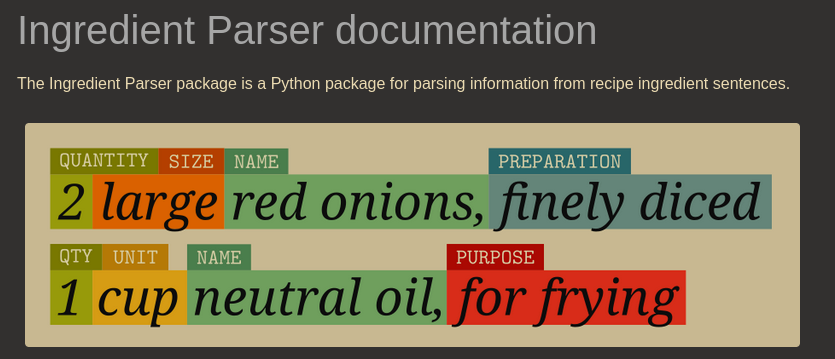
But last week, searching for new solutions to this problem I found a library that looked perfect on paper… but in Python: Ingredient Parser
Bonus, it’s trained against several models, including the NYTimes one. I also want to redo my dataset for French recipes. But for now, I do not really care.
So, here is my new plan:
- Run Python on Android. I’d prefer C++/Swig/Kotlin, but for a POC, I don’t care about the size of speed yet.
- Change my code to use this library instead of doing a request to my server and parse the result
- Translate the list I want to parse, because this was done server side.
- If it works, translate the Python part to native code.
The good news is that the three steps are working. So it seems definitely doable. Because I just want to interpret the CRF model and not train it on the device (I can do it locally).
Let’s do it
How to run Python code on Android
This looks like a bad idea, and to be honest, it’s probably a bad one (except if you’re in Termux and writing some Python code). But the best approach I found for this terrible idea is to use Chaquopy and the good news is that the documentation is pretty good!
In my case, I use an up-to-date Android Studio (Panda 1, 2025.3.1) with Gradle 9.1.0. To use Chaquopy, I just (I got some errors, but it was mostly solved by just updating tools) need to:
build.gradle.kts:
plugins {
    alias(libs.plugins.gradle.versions)
    // ingredient-parser
    id("com.chaquo.python") version "17.0.0" apply false
}
app/build.gradle.kts:
plugins {
    id("com.chaquo.python")
}

android {
    compileSdk {
        version = release(36) {
            minorApiLevel = 1
        }
    }
    namespace = "com.planeat.planeat"

    defaultConfig {
        applicationId = "com.planeat.planeat"
        minSdk = libs.versions.minSdk.get().toInt()
        targetSdk = 36

        ndk {
            abiFilters += listOf("arm64-v8a")
        }
    }
}

chaquopy {
    defaultConfig {
        version = "3.13"
        pip {
            ...
        }
    }
}
In my MainActivity.kt:
class MainActivity : ComponentActivity() {
    @OptIn(ExperimentalMaterial3WindowSizeClassApi::class)
    override fun onCreate(savedInstanceState: Bundle?) {
        super.onCreate(savedInstanceState)

        if (!Python.isStarted()) {
            Python.start(AndroidPlatform(this))
        }

        setContent {
            AppTheme(dynamicColor=false, darkTheme=false) {
                val windowSize = calculateWindowSizeClass(this)

                PlanEatApp(
                    windowSize = windowSize,
                )
            }
        }
    }
}
And then to test it:
val py = Python.getInstance()
val math = py.getModule("math")
val result = math.callAttr("pow", 2, 3)
Everything is not so simple
So now I can run a python module on Android, running another module should be simple.
I just modify by gradle file with:
chaquopy {
    defaultConfig {
        version = "3.13"
        pip {
            install("ingredient_parser_nlp")
        }
    }
}
and got a build failure. Because this module depends on another module that is not available for this distribution.
If we open the pip page for ingredient-parser-nlp 2.5.0 we see that it provides a wheel (a python module in a zip):

that should work anywhere, but in reality it depends on python-crfsuite available pretty everywhere but not on Android (that makes sense, nobody sane would do this). This bundles a C/C++ library (CRFSuite), so we got some native code. Great, I’ll sleep later I guess. Let’s still try to integrate it.
Building a wheel for Android
So, after some research, I found a small tool called cibuildwheel
Seems pretty easy to use, but I have some doubt due to the native part. But let’s give it a try:
# Pre-requisites: Install NDK & latest cmdlines tools in ls ~/Android/Sdk/cmdline-tools/latest/
export ANDROID_HOME=~/Android/Sdk/
export ANDROID_API_LEVEL=36
python -m cibuildwheel --output-dir wheelhouse --platform android --archs arm64_v8a
Giving me:
+ /tmp/cibw-run-m7cmoxsx/cp313-android_arm64_v8a/python/android.py env
/home/amarok/Android/Sdk//ndk/27.3.13750724/toolchains/llvm/prebuilt/linux-x86_64/bin/aarch64-linux-android36-clang does not exist

✕ 2.16s
and fuck. but I see that my latest toolchain is Android 35. So let’s try it:
export ANDROID_API_LEVEL=35
python -m cibuildwheel --output-dir wheelhouse --platform android --archs arm64_v8a
And it works! It generates me:
python_crfsuite-0.9.12-cp313-cp313-android_35_arm64_v8a.whl
So, I update my gradle.kts
chaquopy {
    defaultConfig {
        version = "3.13"
        pip {
            install("src/main/assets/python_crfsuite-0.9.12-cp313-cp313-android_35_arm64_v8a.whl")
            install("ingredient_parser_nlp")
        }
    }
}
But the compilation still fails because it didn’t want to install this new wheel. Which seems wrong, because even if the clang version may generate some unwanted artifacts, the wheel should be accepted. So I just tried a dumb guess by renaming the wheel:
chaquopy {
    defaultConfig {
        version = "3.13"
        pip {
            install("src/main/assets/python_crfsuite-0.9.12-py3-none-any.whl")
            install("ingredient_parser_nlp")
        }
    }
}
And this time, it’s accepted. Nice. Now I can try to parse ingredients!
Parse Ingredients on device
Let’s try to use it with a simple code (Yeah, I did my code blocking. You should not try this at home.)
private val py = Python.getInstance()
private val ingredientParserModule = py.getModule("ingredient_parser")
private val parseIngredientFunc = ingredientParserModule["parse_ingredient"]

fun parseIngredient(ingredientData: String, locale: String): List<IngredientItem> {
    // Because the dataset is in English, translate the ingredient
    val translatedIngredientData = runBlocking {
        async { translator.toEnglish(ingredientData, locale) }.await()
    }

    // Now parse the ingredient
    val parsedIngredient = parseIngredientFunc?.call(translatedIngredientData)
    print("Parsed ingredient: $parsedIngredient")
    // ...
}
And now in the logs I see:
2026-02-28 17:01:10.269 5688-5736 PlanEat com.planeat.planeat I ParsedIngredient(name=[IngredientText(text='non-salty butter', confidence=0.989476, starting_index=7)], size=None, amount=[IngredientAmount(quantity=Fraction(250, 1), quantity_max=Fraction(250, 1), unit=<Unit('milliliter')>, text='250 ml', confidence=0.999731, starting_index=0, unit_system=<UnitSystem.METRIC: 'metric'>, APPROXIMATE=False, SINGULAR=False, RANGE=False, MULTIPLIER=False, PREPARED_INGREDIENT=False), IngredientAmount(quantity=Fraction(1, 1), quantity_max=Fraction(1, 1), unit=<Unit('cup')>, text='1 cup', confidence=0.999048, starting_index=3, unit_system=<UnitSystem.US_CUSTOMARY: 'us_customary'>, APPROXIMATE=False, SINGULAR=False, RANGE=False, MULTIPLIER=False, PREPARED_INGREDIENT=False)], preparation=IngredientText(text='softened', confidence=0.999774, starting_index=10), comment=None, purpose=None, foundation_foods=[], sentence='250 ml (1 cup) of non-salty butter, softened')
Mission accomplished!
Next steps
So, after this night of prototyping, I have 3 new tasks:
- Probably check python-crfsuite build system to send them a pull request to automatically build wheels for Android.
- Contact Chaquopy because I do think that it should install my .wheel without the need to rename it.
- Translate the Python code into native code
See you next week (I’ll try)